Provide scene components
Provide a component
The Scene Provider gives components from the loaded scenes. A member whose type is a component, or an interface
that a component implements, receives one. A member of type GameObject receives the GameObject its context is on. This
replaces calls such as GetComponent and FindAnyObjectByType:
[Inject] Rigidbody body;   // the Rigidbody on this GameObject
[Inject] Camera view;      // a Camera elsewhere in the scene
A member of a collection type receives every component that fits, within the provider's reach:
[Inject] Light[] lights;For a member of an interface type, the Scene Provider looks for a component only when a component class in your project implements the interface. Otherwise it gives nothing, and unless another provider gives one, the Validation tab shows the member as Missing.
Selvage never destroys a component of your scene, only the copies it makes for the
Separate and Pooled lifetimes. When the component is destroyed, a member that holds it reads
as null, like any reference to a destroyed object.
Guarantee a component on the member's GameObject
A member is Guaranteed when the member's own GameObject always holds what it asks for:
- A member of type
GameObjectorTransform. - A member of a component type that the member's class requires with
[RequireComponent], or a class or interface that component is. A requirement on a base class counts, and so does a requirement of a required component.
[RequireComponent(typeof(Rigidbody))]
public class Player : MonoBehaviour
{
    [Inject] Rigidbody body;   // Guaranteed
}
With Require Provide Tuning enabled, the member's GameObject counts only when
the class also requires a Provide Tuning component:
[RequireComponent(typeof(Rigidbody), typeof(ProvideTuning))].
A member stays May Be Supplied when several components the GameObject always holds fit its type,
because two components at the same distance are an error. This applies to a member of type
Component or MonoBehaviour, of the member's own class, or of a type two required
components share, such as a Collider member when the class requires both a BoxCollider
and a SphereCollider. A static member stays May Be Supplied too: it has no GameObject of
its own.
Unity adds a required component only when you add the component that requires it. A GameObject set up before the
class gained its [RequireComponent] can lack the required component: the Console window then displays an
error that names the GameObject and what it lacks, and the next provider is asked. To fix it, add what it lacks
to the GameObject.
How the Scene Provider chooses a component
When several components fit and no preference decides between them, the Scene Provider gives the closest one to the member's GameObject, in the following order:
- The member's own GameObject.
- Its parents, then its children. With Parents First disabled, its children come first.
- The rest of its scene.
- Other loaded scenes, the
DontDestroyOnLoadscene included.
Within the parents, or within the children, the nearest component wins. All components in the rest of the scene are at the same distance, and so are all components in other scenes.
If two components are at the same distance, the Console window displays an error that names both, and the member's dependency is missing. To decide which member receives which component, add a preference with a Provide Tuning component. For more information, refer to Choose between several candidates.
Change how far the Scene Provider looks
The Scene Provider's settings apply to every member it serves. To change them, perform the following steps:
- Go to Edit > Project Settings > Selvage.
- In the provider list, expand Scene Provider.
- Set Reach, Parents First, Include Inactive and Require Provide Tuning. Parents First appears when Reach includes the hierarchy.
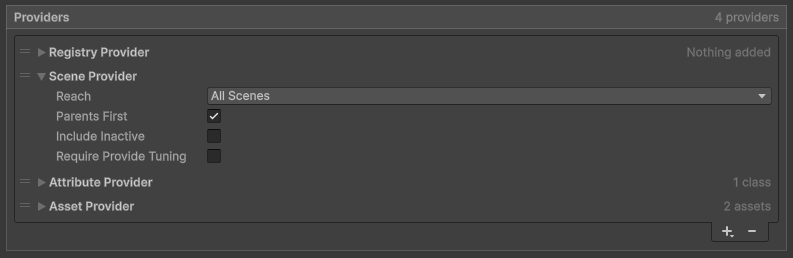
For a description of each setting, refer to Project Settings reference.
A plain C# class or a ScriptableObject isn't on a GameObject, so it receives a component only when the Scene Provider's Reach is All Scenes, the default.
The provider list can hold several Scene Providers, each with its own settings, tried in their order like any other providers.
Provide only the objects you mark
By default, the Scene Provider gives any component of the member's type within its reach. To give only the GameObjects you choose, enable Require Provide Tuning on the Scene Provider, and add a Provide Tuning component to each GameObject it may give. The setting applies to the member's own GameObject too, and a Provide Tuning component covers every component on its GameObject.
To give components on the member's own GameObject without marking them, and mark only the ones farther away, list two Scene Providers: the first with Reach set to Self, the second with Require Provide Tuning enabled.
When the scene has no such component
The Scene Provider gives only components that exist. To make sure a member receives one, pick the place that matches how many you need:
| You need | Do this |
|---|---|
| One for the whole game | Make a prefab of it, and provide the prefab with a Provide Definition set to Permanent. The Scene Provider comes first, so a component already in the scene still wins. |
| One in a scene | Add it to a GameObject in that scene. |
| One for each member, or one lent from a pool | Add it to a GameObject, with a Provide Tuning component set to Separate or Pooled. |
| One on the member's own GameObject | Add [RequireComponent(typeof(...))] to the member's class, so Unity adds it in the Editor. The member is then guaranteed. |
Configure one scene object
A Provide Tuning component changes how the Scene Provider provides the GameObject it's on: its lifetime, whether members follow it, and which members it's for. To add one, perform the following steps:
- Select the GameObject.
- In the Inspector window, select Add Component > Selvage > Provide Tuning.
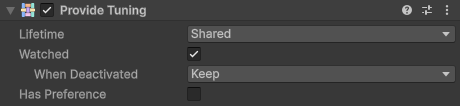
Without a Provide Tuning component, the Scene Provider provides the object with the Shared lifetime, for every member. For a description of each property, refer to Provide Tuning reference.
Follow a scene object
The Scene Provider looks for components only when a member is injected, so members don't notice a component that's created or destroyed afterwards. To have members follow one scene object, enable Watched on its Provide Tuning component. In Play mode, the object then announces when it appears and when it leaves:
| When the object | The members holding it |
|---|---|
| Is destroyed | Drop it on the next frame. A Reactive member receives a replacement when one exists, and any other member returns to its default. |
| Has its GameObject deactivated | Depend on When Deactivated. With Keep, the default, members keep it, and Reactive members are injected again. With Revoke, members drop it, as when it's destroyed. |
| Appears, or is enabled again | Keep what they hold, while Reactive members are injected again and may move to it, such as when it's closer. A Reactive member that holds nothing receives it. |
Turning off only the Provide Tuning component announces nothing.