Provide Tuning reference
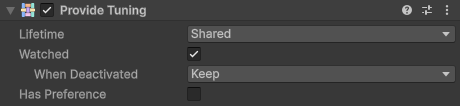
The properties of the Provide Tuning component.
The Provide Tuning component changes how the Scene Provider provides the GameObject it's on. Without it, the GameObject is provided with the Shared lifetime, isn't watched, and has no preference, and a Scene Provider with Require Provide Tuning enabled doesn't find it. To add one, select Add Component > Selvage > Provide Tuning in the Inspector window.
Properties
| Property | Description |
|---|---|
| Lifetime | Shared and Permanent: every member receives this object. Separate and Pooled: each member receives a copy of the whole GameObject, made beside it with Instantiate. A member of a script on this GameObject receives the object itself, whatever the lifetime. For more information, refer to Lifetimes. |
| Watched | Whether members follow this object in Play mode: when it's destroyed, every member holding it drops it, and when it's enabled, Reactive members are injected again and may move to it. Disabled by default. For more information, refer to Follow a scene object. |
| When Deactivated | Appears when Watched is enabled. What deactivating the GameObject does to the members holding it:
|
| Has Preference | Gives the object a preference, which decides which members receive it when several objects could fit. Shows the preference settings. |