Introduction to Selvage
Overview
Selvage assigns the objects your scripts need, so your scripts don't look for them. Injection involves the following elements:
Why inject dependencies
A script that looks for the objects it uses, with GetComponent, FindAnyObjectByType or a
static Instance, has the following limitations:
- Its requirements are hidden in its code. Nothing in the Editor tells you that it needs an
AudioManagerin the scene, so a missing one appears as aNullReferenceExceptionat runtime. - To give it another object, such as a stand-in for a test or a version for one platform, you edit the script, and every other script that looks for the same object.
- It works only where the objects it looks for exist, so it's harder to reuse in another scene or project.
When a script declares what it needs as members instead, the following applies:
- Its members are its requirements, and Selvage checks each of them before you enter Play mode: the Inspector window displays the result. For more information, refer to Validate members.
- Where each dependency comes from is set in one place, the provider list, so you replace it there or in a test without editing the script. For more information, refer to Swap dependencies for tests and platforms.
- The script works wherever a provider can give what it declares.
The following image shows the Selvage section of the Inspector window, with the result of each member of a script:
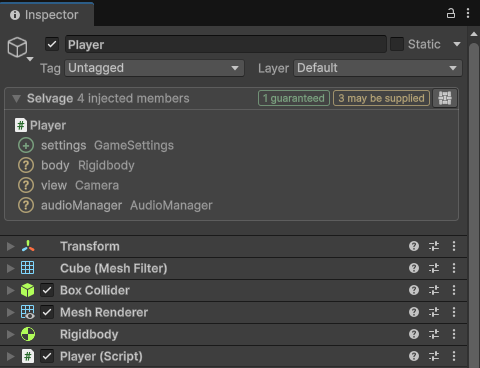
This approach is called dependency injection: a class receives its dependencies instead of finding or creating them, and only the code that hands them out knows which object each one is.
Members and dependencies
A member is a field or property marked [Inject]. Selvage assigns it an object of its
type, which is the member's dependency:
public class Player : MonoBehaviour
{
    [Inject] Rigidbody body;              // a field
    [Inject] Camera View { get; set; }    // a property
}
A member has the following requirements:
- Its type is a reference type, such as a class or an interface.
- A field isn't
readonlyorconst. - A property has a
setorinitaccessor.
Code analysis reports a member that doesn't meet them. For more information, refer to Code analysis reference.
To inject every member of a class, an assembly or the project without marking each one, refer to Inject with scopes.
[Inject] takes options, which change how and when its member is injected, such as
[Inject(Optional = true)] for a member that can work without its dependency. For more information,
refer to Options.
Choose a member's type
A member's type is what the script needs from its dependency. Declare the class itself, such as
AudioManager, when one class does the job. Declare an interface, such as IAudio, when
several classes can do it and the script doesn't care which one, such as one class per platform, or a stand-in for
tests. An interface that only one class implements adds a file to maintain and gives nothing in return, so add it
when a second class appears.
Contexts
The object whose members Selvage injects is the context. A context can be any of the following:
- A MonoBehaviour.
- A ScriptableObject.
- An instance of a plain C# class.
- A type, for its static members. Selvage injects the static members of any class, static or not, as one context.
An instance of a struct is never a context.
Selvage injects a context when it's created, and releases it when it ends. For more information, refer to Injection lifecycle.
Providers and the provider list
A member only declares a type. Where its dependency comes from is decided by providers: each provider gives dependencies from one source, such as the components in your scenes or the assets in a folder.
The provider list holds the providers of your project in order, on the Selvage page of the Project Settings window. For each member, Selvage tries the providers from top to bottom, and the first one that has a dependency gives it:
Because your scripts only declare what they need, you can change where a dependency comes from in the provider list, without editing the scripts that use it.
By default, the provider list holds the four providers that ship with Selvage:
| Provider | Gives |
|---|---|
| Registry Provider | Objects your code adds. |
| Scene Provider | Components in the loaded scenes. |
| Attribute Provider | Instances of your classes marked [Provide]. |
| Asset Provider | Assets in folders that hold a Provide Definition. |
For more information, refer to Provide dependencies.
How a member's type is matched
A member receives an object that is of its type, the way GetComponent finds a component: an object
matches its own class, each of its base classes and each of its interfaces. No type is an exception, so a member of
type object or IDisposable matches almost everything. When several objects match, refer to
Choose between several candidates.
A member of a collection type receives every object of the element type that one provider has. The collection
types are arrays, List<T>, and the interfaces List<T> implements:
IList<T>, ICollection<T>, IReadOnlyList<T>,
IReadOnlyCollection<T> and IEnumerable<T>. The element type is a reference
type:
[Inject] Light[] lights; // every Light of the first provider that has oneThe first provider that has an object of the element type gives the whole collection. Selvage never combines the objects of several providers into one collection.