Choose between several candidates
How Selvage chooses a candidate
An object that could be injected into a member is a candidate. A member can have several candidates, such as when a scene contains two cameras. Selvage chooses among them in the following order:
- The first provider in the provider list that has a candidate gives it. Selvage doesn't consider candidates from the providers below it.
- The candidates' preferences decide: first the candidates whose preference matches the member, then the candidates without a preference, then the candidates whose preference doesn't match.
- Within the Scene Provider, among the candidates the preferences leave tied, the closest component wins.
Preferences don't apply to an object in a local block, which is tried before the provider list and matches by type only, or to a collection member, which receives every candidate of the first provider that has one.
If nothing tells two candidates apart, the member receives nothing, and Selvage displays an error that names the
candidates and how to fix it. A required member then fails. For classes marked [Provide] and for assets,
the Validation tab reports the tie before you enter Play mode.
Add a preference
A preference on a candidate indicates which members the candidate is for:
[Provide, Preference]                                 // for every member
public class GameAudio : IAudio { ... }

[Provide, Preference(ContextType = typeof(Menu))]    // for the members of Menu
public class MenuAudio : IAudio { ... }
In this example, the members of the Menu class receive MenuAudio, and every other
IAudio member receives GameAudio.
Where you add a preference depends on the candidate:
| Candidate | Where to add the preference |
|---|---|
| Scene component | A Provide Tuning component on its GameObject, with Has Preference enabled. |
[Provide] class | A [Preference(...)] attribute next to [Provide]. |
| Registry entry | The preference argument: Add(obj, preference: new Preference { ... }). |
| Asset | Its Provide Definition, with Has Preference enabled. |
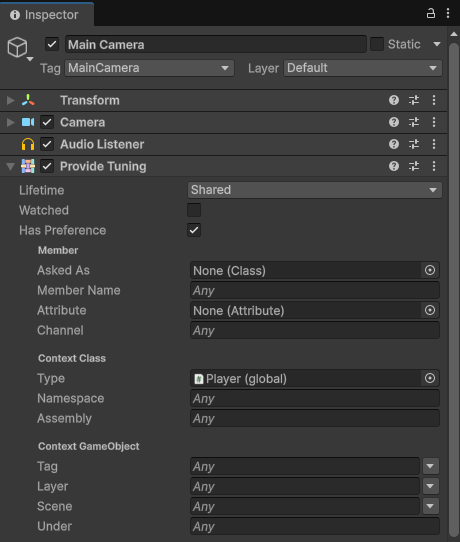
The Attribute Provider leaves out a class that has [Preference] without [Provide].
Preference settings
A preference matches a member when every setting you set matches the member. Leave the other settings empty.
| Setting | In the Inspector window | Matches a member |
|---|---|---|
AskedAs | Member > Asked As | That asks for exactly this type. |
MemberName | Member > Member Name | With this name. Case and a leading m_ or _ are ignored. |
MemberAttribute | Member > Member Attribute | That has an attribute of this class, or of a class that derives from it, such as SerializeField. |
Channel | Member > Channel | With this channel. The Inspector window takes it as text: a string, or the name of an enum value. |
ContextType | Context Class > Type | Whose context is of this class, or of a class that derives from it or implements it. |
Namespace | Context Class > Namespace | Whose context's class is in this namespace, or in one inside it. |
Assembly | Context Class > Assembly | Whose context's class is in the assembly with this name. |
Tag, Layer, Scene | Context GameObject > Tag, Layer, Scene | Whose context's GameObject has this tag, is on this layer, or is in the scene with this name. |
Under | Context GameObject > Under | Whose context's GameObject is at this path from its scene's root, or below it, such as "UI/HUD". |
In a text setting, * matches any text, anywhere and any number of times, such as
"Level*". No other pattern syntax exists. A type setting accepts an open generic type, such as
typeof(Repository<>), to match every type made from it.
The settings that read the context's GameObject (Tag, Layer, Scene and
Under) never match a context that isn't on a GameObject, and are only known when the member is
injected, so the Validation tab can't use them.
An empty preference matches every member, so its candidate wins wherever no more precise preference matches.
When several preferences match
When several preferences match a member, the most precise one wins: the one that matches everything the others
match, and more. For example, "UI/HUD" wins over "UI", and an exact value wins over a
pattern that matches it. If no preference is more precise, Selvage displays an error. The Dependencies window reports
it before you enter Play mode when it can.
A preference never removes a candidate: when there's only one candidate, a member receives it, whatever its preference. Selvage never reports a preference or a channel that matches nothing, so a script copied into another project keeps working there.
Channels
A preference lets the candidate choose its members. A channel lets the member choose its
candidate: the candidate whose preference has the same Channel value wins for that member.
[Inject, Channel("Music")] IAudioBus bus;

[Provide, Preference(Channel = "Music")]
public class MusicBus : IAudioBus { ... }
A channel can be any value, such as a string, an enum value or a number. A member has one channel at most, and a channel doesn't apply to an object in a local block. A channel is a hint: with one candidate, the member receives it whatever its channel.
To read the channel from a field or property of the context's class each time the member is injected or
reinjected, use [DynamicChannel]. When it's combined with [Channel], the written channel
applies while the field or property holds null:
[SerializeField] string language;

[Inject, DynamicChannel(nameof(language))] AudioClip greeting;              // the channel is the value of language
[Inject, Channel("en"), DynamicChannel(nameof(language))] AudioClip intro;  // "en" while language is null
The field or property can be static. To use a value from another class, read it through a property of this one.
Code analysis reports a name that isn't a readable field or property as SLV0108.
A [DynamicChannel] is only known when the member is injected, so the Validation tab can't use it.