Provide assets
Create a Provide Definition
A Provide Definition is an asset that makes Selvage provide other assets: the assets of its folder, or a list of assets you choose. Members of an asset's type then receive the asset, without a reference to assign in the Inspector window.
To provide the assets of a folder, perform the following steps:
- In the Project window, select the folder that holds your assets.
- Go to Assets > Create > Selvage > Provide Definition.
- Add a member of an asset's type to a script.
[Inject] GameSettings settings; // 3. A GameSettings asset in that folderThe Inspector window of the Provide Definition lists every asset it provides.
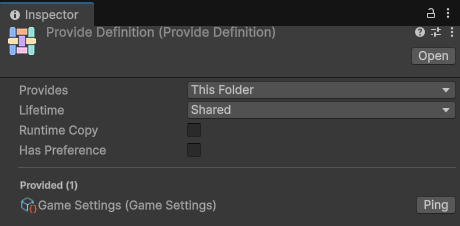
To provide assets from several folders, or only some assets of a folder, set Provides to List, and add the assets to the list. For a description of each property, refer to Provide Definition reference.
The properties of a Provide Definition apply to every asset it provides. To give some assets other properties, put them in another folder with its own Provide Definition.
A folder provides its main assets only: not its sub-assets, such as a sprite inside a texture, other Provide Definitions, or Editor-only assets, such as scripts, scenes and assembly definitions. A list provides whatever you add to it, sub-assets included.
With the Shared or Permanent lifetime, Selvage gives the asset itself, so changes made to it in Play mode stay, as with any asset. To give every member one copy instead, enable Runtime Copy. With the Separate or Pooled lifetime, each member receives its own copy, which is never saved into the asset.
Provide a prefab
Selvage instantiates a provided prefab, and never gives the prefab itself. A member receives the instance, or the component it asks for on the root of the instance:
[Inject] ParticleSystem explosion; // the ParticleSystem on an instance of a provided prefabWith the Shared lifetime, every member receives the same instance, which Selvage destroys once no member holds it.
In Play mode, Selvage keeps that instance under DontDestroyOnLoad, so a scene load doesn't destroy it
while a member holds it. With Permanent, the instance stays until play stops (one made in Edit mode, until scripts reload), even when no member holds it: use it
for a manager that keeps its state for the whole game. With Separate or Pooled, each member receives its own
instance.
Nested Provide Definitions
When several Provide Definitions cover an asset, the closest one wins, as with assembly definitions. A subfolder's Provide Definition wins over its parent folder's, and a Provide Definition that lists the asset wins over any folder. If two are at the same distance, such as two lists that hold the same asset, Selvage displays an error in the Console window and in the Inspector window of both, and the Provide Definition whose path comes first alphabetically provides the asset.
To see every asset your project provides, expand Asset Provider in the provider list.
When Selvage loads an asset
When Selvage loads an asset depends on where the asset is:
| Asset location | Loads |
|---|---|
A Resources folder | When a member first needs it, with Resources.Load. |
| An Addressables entry, or a folder that is one | When an Async or Warm member first needs it, because loading takes time. Other members don't receive it. |
| Any other folder | When the application starts. The build references the asset from the Selvage settings, which Unity preloads. |
Selvage loads an asset once, and keeps it while anything it gave from the asset is held, such as the asset, a copy
or a prefab instance. A build stores the path of a Resources asset and the GUID of an addressable asset,
so neither loads before a member needs it.