Cloud & Remote Advanced
A save that lives on a server follows the player across devices. Both managers here can also keep the game playable with no connection, through an optional offline cache.
Remote means asynchronous
A remote load reaches a server, so it cannot run synchronously. Use
LoadAsync() / await WhenReady rather than LoadSync()
(which reports that it cannot run synchronously). With the offline cache on, a save
can complete synchronously (it lands in the cache and pushes in the background), but a load
still goes to the server.
Readiness is a real state here, unlike with the local managers: gate once on
await WhenReady in your boot flow (see
Core Concepts). Until the player is authenticated
and the server is reachable, the automatic load keeps retrying and IsReady stays
false, so a save never clobbers data a retry could still fetch.
The offline cache
Both remote managers can persist through a local cache, set with Cache Mode:
- No Cache: every load and save reaches the server; a load fails while it is unreachable.
- Server + Cache: the cache keeps the game playable offline, but a load still goes to the server whenever it is reachable (falling back to the cache only when it is not), so it picks up saves made on other devices; a conflict between the two is settled by the most recent save (this relies on device clocks).
- Local Cache (Server Backup): the cache is the source of truth and the local save always wins; the server is a write-only backup, read only when nothing is cached, such as after a reinstall. That is a cloud backup and offline play rather than live cross-device sync.
With a cache on, a save lands locally first and succeeds even with no connection, then a
background push loop reconciles it with the server when the server is reachable. Data a
previous session could not push starts uploading as soon as the manager is in scope; marking
the target IAlwaysGlobal makes that happen at
game launch.
When nothing is cached and the server cannot be reached, Offline Cold Start decides what a load does:
- Wait For Server (the default): keep retrying until reachable, so a reinstalled device restores its backup instead of starting fresh over it. A brand-new offline player cannot start until the server is reachable.
- Start Fresh: start on default data so a new player can play offline, at the cost of that protection.
A "saving / saved" indicator
With a cache on, Status reports whether everything has reached the server
(UpToDate) or local changes are still waiting (PendingChanges).
StatusChanged fires when it changes:
remoteManager.StatusChanged += status =>
    cloudIcon.SetActive(status == RemoteStatus.PendingChanges);
To flush now instead of waiting for the background retry (for example before sign-out),
call PushPendingChanges() and await the resulting status.
Server (HTTP)
Server (HTTP) is a built-in persistence manager that saves to your own server
over HTTP. Each save lives at its own address, url/slot/id: the configured URL,
the slot when there is one, and the save's id.
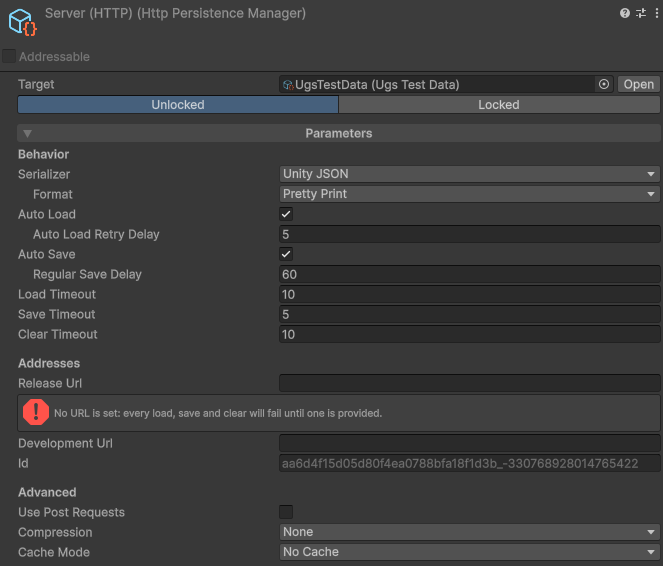
- Release Url / Development Url: the endpoint, with an optional override used in the editor and development builds (a local or staging server).
- Id: override the last part of the address (defaults to the manager's unique id).
- Use Post Requests: send saves and clears as POST with an
X-HTTP-Method-Overrideheader, for hosts that refuse PUT and DELETE. - Compression: gzip the body before sending (the server must store and return it verbatim).
The server only needs three routes:
GET url/slot/id: return the stored body (404 when there is none).PUT url/slot/id: store the request body verbatim.DELETE url/slot/id: remove it.
For authenticated servers, provide credentials from code at runtime:
// Sent as the Authorization header of every request
HttpPersistenceManager.Authorization = "Bearer " + token;

// Or adjust each request yourself (api key, signed query, extra headers)
HttpPersistenceManager.ConfigureRequest = request =>
request.SetRequestHeader("X-Api-Key", apiKey);Cloud Save (UGS)
Cloud Save (UGS) is a built-in persistence manager that saves to Unity Gaming Services Cloud Save, per signed-in player. Each save lives under a key in that player's Cloud Save data.
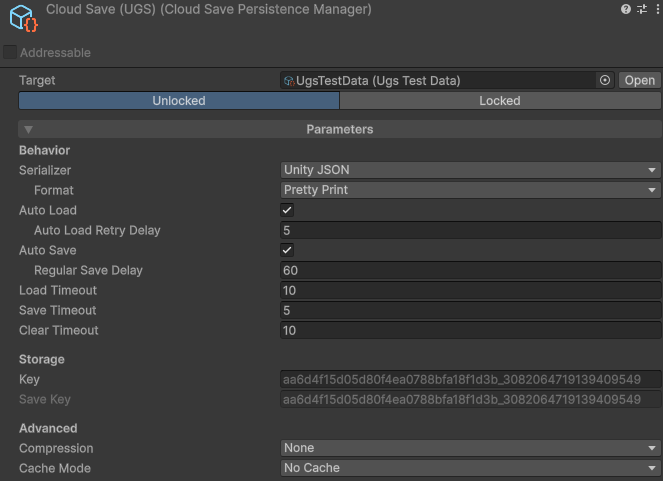
- Key: the storage key (defaults to the manager's unique id). Cloud Save keys allow only letters, digits,
-and_. - Compression: gzip (and base64, since Cloud Save stores a string) to fit larger saves under the value-size limit.
Custom managers
Another remote (a different REST contract, a third-party service, PlayFab, a custom socket
protocol) is a custom persistence manager: override the
async read, write and clear methods, as with any manager. For an offline cache, a background
push loop and conflict handling, inherit RemotePersistenceManager instead and
implement three primitives (FetchRemote, StoreRemote,
DeleteRemote). An always-online service does not need it. See
Extending.