Settings
Everything under Project Settings > Persistent Asset.
Project-wide settings live in Edit > Project Settings > Persistent Asset (or Tools > Persistent Asset > Settings), split into the sections below. Commit the settings file to your version control.
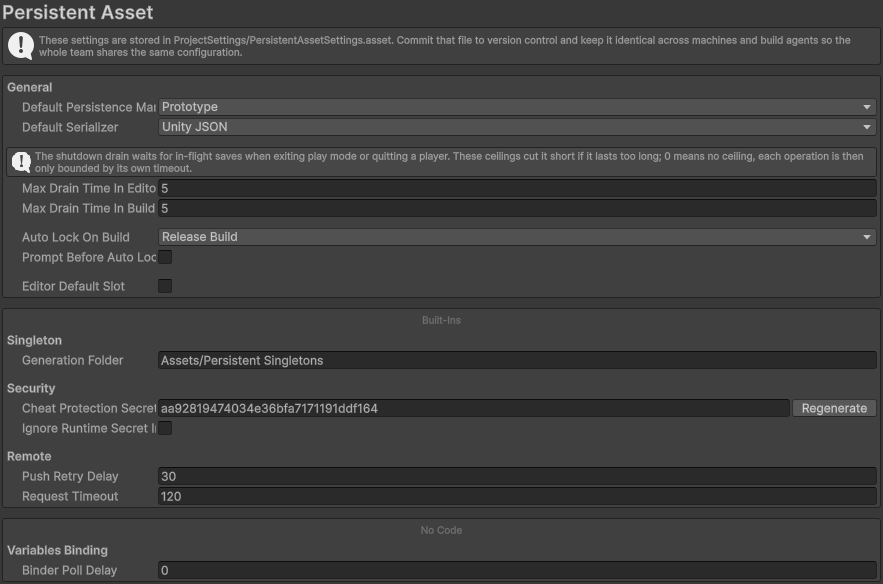
Edit > Project Settings > Persistent Asset, all sections in one place
General
| Default Persistence Manager | The manager assigned to a newly created persistent object (default: Prototype). Set it to None to create them with no manager. |
| Default Serializer | The serializer a new (or reset) manager starts with (default: Unity JSON). |
| Max Drain Time In Editor Max Drain Time In Build | Hard ceiling, in seconds, on the shutdown drain when leaving play mode and when quitting a build (5 each by default; 0 means no ceiling). |
| Auto Lock On Build | When a build automatically locks every manager's breaking fields: Any Build, Release Build (default), or None. |
| Prompt Before Auto Lock | Whether the automatic lock asks for confirmation first (off by default; a command-line build never prompts). |
| Editor Default Slot Slot Name | Editor convenience: the toggle seeds a starting slot (named in Slot Name) so a multi-slot object works when you press Play straight into a gameplay scene. Off by default, ignored in a build. |
Asset References
Which project assets your save data is allowed to point at. See saving asset references for what this is for.
| Register Referenced Assets | Automatically register the assets your persistent objects point at, so assigning one to a field is all that is needed. On by default; an unregistered reference cannot be saved. |
| Registered Folders | Every asset in these folders is registered, without having to assign it anywhere first. Use it for a family your code picks from at runtime, such as an items folder. Sub-assets are not covered, register those by hand. |
The section also shows how many assets are registered, with a button opening the full list (also at Tools > Persistent Asset > Actions > Asset References). Every entry is an asset your build carries and loads at startup.
Singleton
| Generation Folder | Editor only: the folder where a PersistentSingleton asset is auto-created for each of its subclasses (default Assets/Persistent Singletons). |
Security
| Cheat Protection Secret | The secret the encryption and integrity key is derived from (see Securing saves). Generated automatically, unique to your project; changing it makes every existing protected save unreadable, so commit it and keep it identical across builds. |
| Ignore Runtime Secret In Editor | Editor only: lets a manager whose Lock Save To includes RuntimeSecret be played in the editor without the runtime secret your code provides. Builds always honor the lock. |
Remote
| Push Retry Delay | Seconds between attempts to push pending offline-cache data to the server (default 30, clamped to at least 5). |
| Request Timeout | A hard ceiling, in seconds, on a single remote request, a safety net against a server that accepts a connection but never answers (default 120; 0 disables it). Normal operation is governed by each manager's own Load / Save / Clear Timeout, which usually ends a request first. |
Variables Binding
| Binder Poll Delay | Seconds between a Variable Binder re-reading its bound components for changes. Defaults to 0.1; 0 means every frame, at a per-frame reflection and allocation cost. |