Update a shipped save
Lock and migrate saves
A lock keeps the saves your players already have working. It marks a manager as shipped: its breaking fields turn read-only, and a change that would strand those saves offers to migrate them first, so you can't strand them by accident.
The breaking fields are the settings that decide where a save is stored and how it is written: the file name, compression, encryption, the server URL, the serializer and so on.
A release build locks every manager for you. To lock them yourself, go to Tools > Persistent Asset > Actions > Lock All Persistence Managers.
Migrate with an import copy
When you change something that would strand the saves a manager has already written, the package offers to keep the old setup as a read-only import copy:
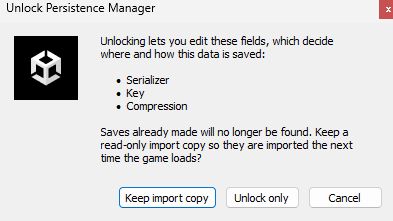
The copy stays under the asset as a sub-asset named [Import N] .... The next time the new
manager finds no save of its own, it reads that copy, writes the data back in the new format and place,
then deletes the copy, so each player's save migrates once.

Clear a lock whose manager is gone
Deleting a manager leaves its lock behind. To tidy those away once the managers are gone for good, go to Tools > Persistent Asset > Actions > Clear Orphaned Locks….
Version your data
Some changes need nothing from the package. A new field loads at its default value, and your
serializer's own mechanisms cover others, such as renaming a field with
[FormerlySerializedAs("oldName")] on Unity JSON.
Implement IUpgradable for a change none of that covers:
public class PlayerData : PersistentScriptableObject, IUpgradable
{
    public int coins;

    public int SaveVersion => 1;

    public void Upgrade(int fromVersion, SaveNode oldData)
    {
        // v0 stored "gold" and "silver" separately; combine them
        if (fromVersion < 1)
            coins = oldData["gold"].AsInt() + oldData["silver"].AsInt();
    }

    public bool Downgrade(int fromVersion) => false;   // refuse a save from a newer build
}
Upgrade runs after the load, and only on a save older than the current version. An asset
with no IUpgradable ships as version 0, so you can add the interface in a later release.
For a change even IUpgradable can't express, keep the old asset, create a new one beside it,
and copy the values across in DynamicInitialize().
Delete a player's data
A right-to-erasure request, such as a privacy or account-deletion request, has to remove everything that
player saved, not only what is loaded now. Persistence.ClearAll() reaches the managers that
are in scope at that moment, and only their current slot, so the other slots have to be read before
anything wipes the registry that lists them:
// Every save asset and slot registry of that player is in scope by now.
List<string> slots = new(profileRegistry.SavedSlots);   // read it before clearing empties it

await Persistence.ClearAllAsync();                       // the current slot of everything in scope

foreach (string slot in slots)
    foreach (ClearResult result in await Slots.DeleteAsync(slot, profileData, worldData))
        if (result.IsFailure || result.IsCancelled)
            return false;                                 // that slot still holds data: say so

await remoteManager.PushPendingChangesAsync();          // only with an offline cache on
return true;
Await each operation, so the deletes have run before your code reports success. The slot that was
current answers Ignored, because the clear above already emptied it.
AuthenticationService.Instance.DeleteAccountAsync() removes the identity.