Scene Objects
Save an object in your scene
A Persistent Scene Object component marks a GameObject the save keeps, one component at a time:
- Add a Persistent Scene Object component to the GameObject.
- Tick each component whose state you want kept.
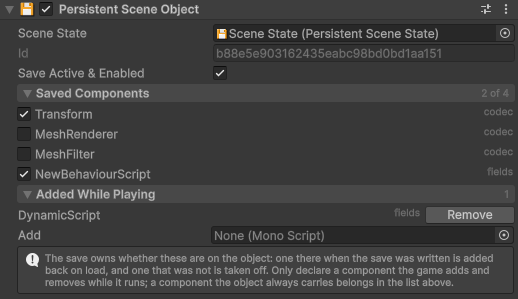
Tick a component under Runtime Components instead when the GameObject gains and loses it while the game runs, and the save decides whether the component is there at all.
The state of every ticked component lands in a Scene State asset, an ordinary persistent asset. A new scene object attaches itself to one, and the package creates the project's first one. Select Create > Persistent Asset > Scene State to add more: each one is a save of its own, with its own manager and its own storage.
Awake. A value it rolls or computes in Awake therefore counts as
authored and stays out of the save, while one set in Start or later is saved.Supported components
The package ships a codec for each of the following components.
| Component | Notes |
|---|---|
| Transform | Local position, rotation and scale, so a reparented object still lands in place. |
| RectTransform | Anchors, pivot, anchored position and size, plus rotation and scale. |
| CharacterController | Switched off while the transform is restored, so it can't snap the object back. Tick Transform as well. |
| Rigidbody, Rigidbody2D | Take their position from the restored transform, so tick Transform as well. |
| NavMeshAgent | Needs Unity's AI module. |
| Animator | A transition in flight is not restored, and triggers are never re-fired. |
| Animation | The legacy component. Which clips were playing, how far in, and their speed and weight. A crossfade in flight resumes from the weights it had. |
| AudioSource | Whether it was playing and how far in, its volume, pitch and looping, so music resumes where it left off. |
| VideoPlayer | The video, how far in, whether it was playing or paused, its speed and looping. A video clip travels as an asset reference. A URL under StreamingAssets or the persistent data folder is saved relative to that folder, so it still points at the video after an app update or on another device. Any other URL is saved as it is; a local file the loading device doesn't have is skipped, and the player keeps the URL your game sets. Needs Unity's Video module. |
| Camera | Field of view, projection, background and culling mask. |
| Light | Type, color, intensity, range, cone and shadows. |
| MeshFilter | The mesh, as an asset reference. |
| MeshRenderer, SkinnedMeshRenderer | Materials and meshes travel as asset references, so a slot whose material is not a registered asset keeps the one the object already has. A skinned renderer's bones stay as the rig built them. |
| SpriteRenderer | Sprite, color and flip. The sprite travels as an asset reference. |
| LineRenderer | Points, widths and colors. |
| TrailRenderer | Its length, widths and colors are saved. The trail already drawn is not, so a restored object draws a new one from where it stands. |
| ParticleSystem | Whether it was playing and how far into its timeline it had run are saved. The particles alive at that moment are not: the system replays from its start up to that point. |
| Slider, Toggle, InputField, Dropdown, ScrollRect | Restored without raising the control's change event. |
| TMP_InputField, TMP_Dropdown | Restored without raising the control's change event. |
To cover a component this package doesn't reach, or to replace one it ships, register a codec of your own.
Spawned and destroyed objects
A spawned GameObject is saved when the prefab it comes from carries a Persistent Scene
Object component. Keep calling plain Instantiate, and a load spawns it again.
A GameObject your code builds from nothing has no prefab to bring it back, so nothing about it is
saved.
The package records the destruction of an authored GameObject, so it stays gone after a load. Destroying a spawned one drops its record instead. Leaving a scene, quitting, and switching a GameObject off are not destruction.
A load or a slot change that no longer has a destroyed GameObject destroyed cannot put it back in place, because it no longer exists. It comes back the next time its scene loads, and the Console names it. To have the package reload the scene for you, turn on Reload Scenes To Restore Destroyed Objects in Edit > Project Settings > Persistent Asset.
Parenting is saved, as long as the parent carries a Persistent Scene Object component too.
OnDestroy call, so destroying it goes unrecorded and it comes back. Switch it on at some
point, or call PersistentSceneState.RecordDestroyed.DontDestroyOnLoad on it. The next save files it with the other GameObjects that outlive scene
loads.Save a scene reference in a persistent asset
Unity refuses to serialize a scene reference into a project asset, so a persistent asset can't hold
one. Serialize a
SceneRef field instead, which stores
the object's id and resolves it against what is loaded:
public class GameState : PersistentScriptableObject
{
    public SceneRef lastCheckpoint;
}

gameState.lastCheckpoint = new(checkpointObject);   // a Persistent Scene Object

if (gameState.lastCheckpoint.TryResolve(out Checkpoint checkpoint))
    player.position = checkpoint.transform.position;
In a saved component
A component ticked on a Persistent Scene Object keeps its scene references as ordinary
fields: a Transform, a GameObject or a component of any type, in a list or a dictionary too.
Each one is saved through the nearest Persistent Scene Object on the referenced GameObject or on one of its
parents, so a child of a GameObject that has one works, including inside a prefab you can't edit. The
Console names a referenced GameObject with none above it.