Save per platform
Set up routes
One platform sometimes can't save the way the others do: a console saves through its own SDK, a Steam build may want Steam Cloud, everything else a plain file. The Platform (Routing) manager holds one manager per platform and picks between them at runtime, so the asset and your game code stay the same everywhere.
It holds one route per platform, and each route holds the manager that saves there. The first route that claims the platform the game is running on wins.
For example:
| Route | Platforms | Saves with |
|---|---|---|
| 1 | Windows Editor | Session (Memory) |
| 2 | PS5 | your PS5 manager |
| 3 | Switch | your Switch manager |
| 4 | (none) | Local File |
The router holds the settings that describe the data, and each route's manager holds where its bytes go.
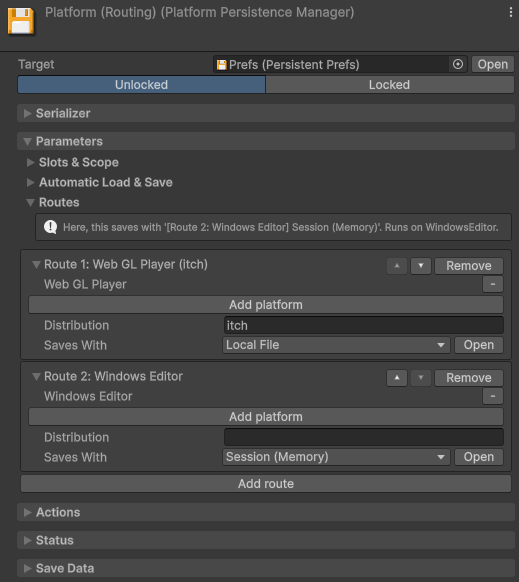
The Editor is a platform of its own, so a set of routes that names only player platforms
would match nothing in Play mode. The package resolves that in three steps: a route claiming the Editor
platform, then one claiming the matching player platform (WindowsEditor stands in for
WindowsPlayer), then the fallback. When none of the three match, persistence is
disabled.
Route two builds of the same platform
Two builds of one platform can need different storage, and the platform alone can't tell them apart: a
Steam build, a Microsoft Store build and an itch build are all WindowsPlayer. Name the build
once, and routes can match that name:
[RuntimeInitializeOnLoadMethod(RuntimeInitializeLoadType.SubsystemRegistration)]
static void SetDistribution() => Persistence.Distribution = "Steam";
Distribution is a free string, matched ignoring case. A route that leaves it empty takes any distribution, and a route that asks for one while none is set falls through to the fallback. To try a distribution without building, set Editor Distribution in Project Settings > Persistent Asset.
Convert an existing manager
To give an asset that already saves a router, open the manager's context menu and select Route Per Platform. The manager becomes the fallback route of a new router, with its identity, its configuration and its storage untouched.
Consoles
Console save APIs are under NDA, so the package can't ship a console manager, and the built-in managers refuse console build targets. Write a manager of your own. Slots, compression and encryption work there as they do anywhere else.
Carry the console user in the slot, so that a user switch becomes a scope transition:
protected override SaveResult WritePayloadSync(PersistenceSource source, string slot, byte[] payload)
{
    // Stand-ins for the platform SDK: the slot names the console user.
    using SaveContainer container = SaveContainer.Mount(slot);

    container.Write(FileName, payload);

    // Commit inside the write, where the operation's timeout covers it.
    return (container.Commit()) ? SaveResult.Success() : SaveResult.Failure("The save container is full.");
}OnLeavingScope. That hook runs before the scope's final automatic save, so
unmounting there throws away the save the package is about to write.Certification usually asks for a visible indicator while save data is written, with a minimum duration, and for a declared maximum save size. Draw that indicator from the manager's save and clear events, which carry the result too, so a failure your write reports reaches the player from the same place.