Data class
Write the class
To make a class of your own persistent, inherit
PersistentScriptableObject and
add the fields you want to persist. The values those fields hold outside Play mode are the values a new
player starts with.
public class PlayerData : PersistentScriptableObject
{
    public int gold;
    public int level = 1;
    public List<int> clearedLevels = new();
}
Which fields can be saved depends on the serializer the asset uses. For more information, refer to What can be saved.
Create the asset
One asset instance of your class is one save. To create it:
- In the Project window, select Create > Persistent Asset > Persistent Object….
- Select your class, then name the asset.
You can move or rename the asset afterwards.
A new asset saves through the Prototype manager, with nothing to set up. To store it somewhere else, select a manager from the dropdown at the top of its Inspector window. For more information, refer to Choose a persistence manager.
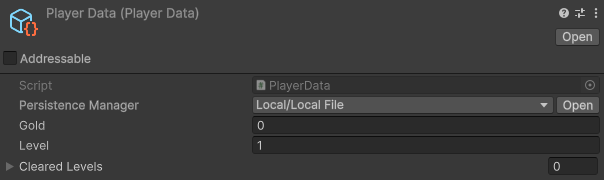
Use the asset like any other ScriptableObject:
[SerializeField] PlayerData playerData;

void CollectCoin() => playerData.gold++;Persist a class that already has a base class
When your class already inherits a ScriptableObject of its own, use the
[PersistentScriptableObject(...)] attribute instead of the base class:
- Add a serialized
PersistenceManagerfield to the class. - Decorate the class with
[PersistentScriptableObject(...)], and name that field in the attribute.
[PersistentScriptableObject(nameof(persistenceManager))]
public class MyData : SomeOtherScriptableObject
{
    [SerializeField] PersistenceManager persistenceManager;
}
Everything else on this page applies unchanged.